
Image Background Remover
Remove backgrounds from any image for free, right inside your browser. AI-powered background removal handles hair, pets, and complex images, while a brush tool helps refine edges for more accurate results.
Drag & drop an image, or click to browse
Any size or orientation — PNG, JPG, WebP, GIF, BMP, AVIF. Processed privately on your device.
What Does This Image Background Remover Do?
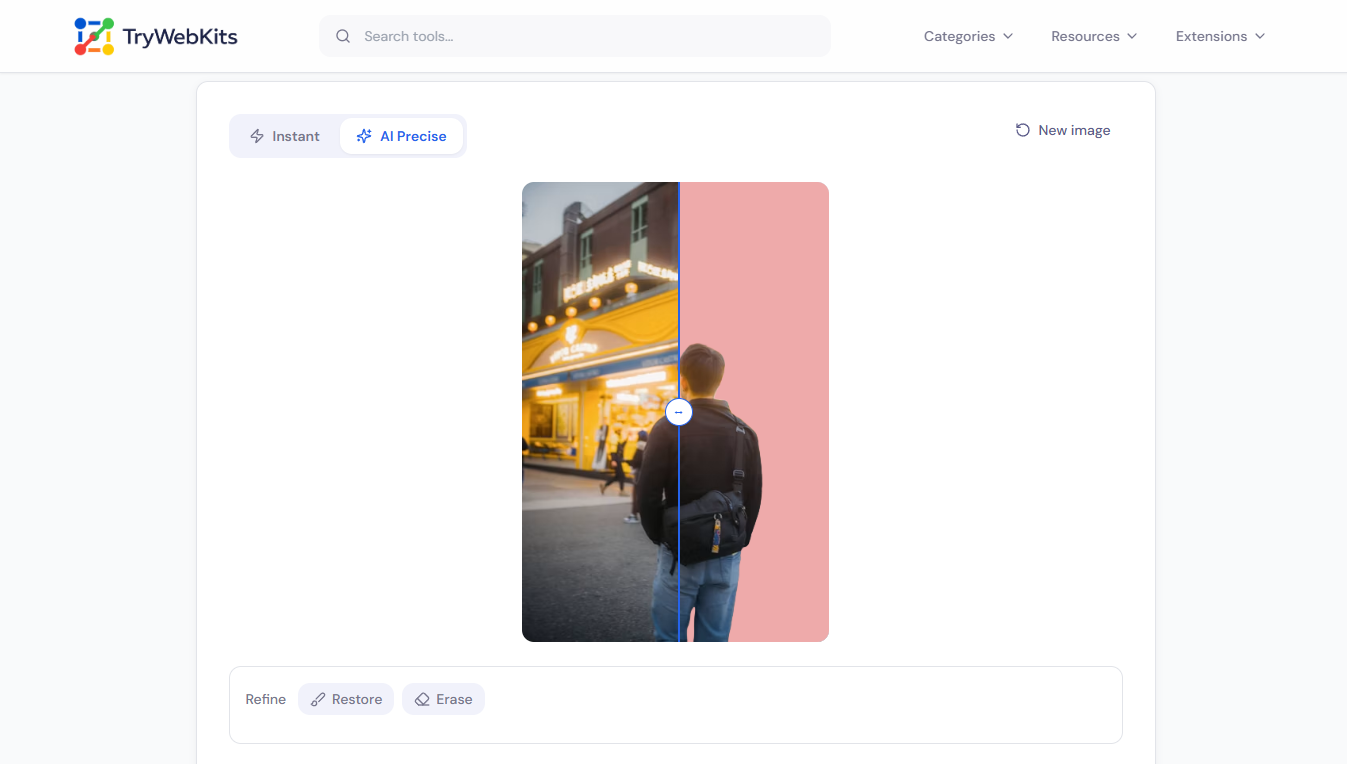
This Image Background Remover cuts a subject out of any photo and returns a clean, transparent PNG. It runs two modes: an Instant mode that erases solid or single-colour backgrounds the moment a file loads, and an AI Precise mode that handles hair, pets and busy scenes.
Both work right inside the browser, so the picture is never sent anywhere. Drop in a JPG, PNG or WebP of any size, remove or recolour the background, fine-tune the edges, and download the result. There is no account to make, no watermark on the export, and nothing to install.
How To Remove Image Backgrounds In Seconds?
Removing a background takes four short steps, start to finish:
- 1
Add an image by dropping a file, selecting one, or pasting a link.
- 2
Pick the Instant mode for plain backgrounds, or AI for detailed ones.
- 3
Adjust the tolerance, or brush the edges until the cutout looks right.
- 4
Choose a background colour, then copy or download the finished image.
Quick Tutorial
Watch a quick walkthrough to learn how to use the tool.
How Image Background Remover Works?
Two simple modes, one workflow, everything runs in the browser. Photos never leave the device.
Instant Mode
No downloadReads the colour around the photo and clears solid or white backgrounds the second a picture loads. Works fully offline, nothing is fetched.
AI Precise Mode
One-time modelFor hair, pets and busy photos, the AI finds the subject on its own. A small AI file loads once, then runs on the device.
Add an Image
Drop a file or paste a link. The picture loads straight into the browser, never uploaded to a server.
AI File Loads (AI only)
The first AI cutout fetches an open-source file from Hugging Face. Only that file is downloaded, the photo is never sent.
Background Removed
All the work happens locally on the device. Refine any edge with the Restore / Erase brush for a clean cut-out.
Save The Image
Pick a transparent, white or custom background, then copy or download a clean transparent PNG.
What leaves the device: only the AI file downloads from Hugging Face, and only when AI Precise Mode is used.
What never leaves: the image itself, which is processed entirely in the browser.
Key Features Of Our Image Background Remover
Explore the features that make background removal quick and easy.
Colour Picker
Sample the exact background shade with the eyedropper for cleaner edges on tricky colours.
Refine Brush
Restore or wipe any spot with a touch-friendly brush for precise, hand-finished cutouts.
Background Swap
Drop the subject onto transparent, white, black or any custom colour in one tap.
Edge Control
Soften or sharpen the outline with tolerance and feather sliders for natural blends.
Paste a URL
Load a photo straight from a web link, with no manual saving and re-uploading needed.
Clean Export
Copy to the clipboard or download a high-quality transparent PNG of any photo or logo, watermark-free.
Adobe vs Canva vs TryWebKits: Which Background Removal Tool Is Best for Print?
Whether you're creating product photos, marketing materials, or documents for printing, this comparison highlights the key differences between Adobe, Canva, and TryWebKits.
| Factor | Manual editing | Adobe | Canva | TryWebKits |
|---|---|---|---|---|
| Setup | Learn the software | Sign in or subscribe | Free account | Just open the page |
| Where the image is processed | On the device | Desktop or Adobe cloud | Uploaded to Canva | In the browser only |
| Cost to remove a background | Software licence | Paid plan | Pro feature | Free |
| Skill required | High | Low to medium | Low | Low |
| Max working size | Full resolution | Full resolution | High resolution | Up to ~2800px on the longest edge |
| Speed to first result | Slow, done by hand | Fast, auto tools | One click | Instant on load |
| Works offline | Yes, on desktop | Desktop yes, cloud no | No, web only | Yes, after first AI load |
| Best suited for | Full manual control | Detailed retouching | Quick design graphics | Fast, private cut-outs |
For fast, private, no-cost transparent cutouts at common print sizes, this tool is the simplest of the four. For oversized posters that rely on every original pixel, a desktop editor keeps more resolution. Service features change over time, so figures reflect typical use.
Data And Privacy
Every image is processed inside the browser, on the device that opened the tool. Pictures are never uploaded to a server, stored, or shared. The only network request the tool makes is a one-time download of the open-source model from Hugging Face, and only when the AI Precise engine is selected; that file loads fresh on each visit and is not saved to disk. When a photo is imported from a web link, the address is checked first to block private and internal networks.
Frequently Asked Questions
JPG, PNG and WebP work directly. Some HEIC photos from the iPhone may need converting to JPG or PNG first before they can be opened.
Yes. The page and the brush are touch-friendly, so backgrounds can be removed and refined on mobile, tablet, laptop or desktop.
There is no limit on how many images can be processed. Very large pictures are scaled to about 2800px on the longest edge for smooth editing.
The model downloads once per visit before it runs. After that, further images are handled quickly in the same session without another download.
The tool sets the background to a solid colour or leaves it transparent. A replacement photo can be layered afterwards using a separate image editor.
Yes. Drop in a JPG or PNG logo, clear the background, and download it as a transparent PNG ready for websites, prints or merchandise.
You May Also Like
Image to GIF Converter
Convert Images into a high-quality GIF. Arrange frames, add watermark, text, and adjust speed.

EXIF Data Viewer
Extract GPS location, camera settings, timestamps, and all metadata from photos and videos. Privacy scanner included!

Image Compressor and Resizer
Reduce image size and resize photos quickly without losing quality.

Metadata Editor
Edit EXIF, GPS, copyright, dates and more on JPEG, PNG and PDF files. Add unlimited custom fields.