
URL List Cleaner
Clean, dedupe, trim and sort thousands of messy URLs at once.
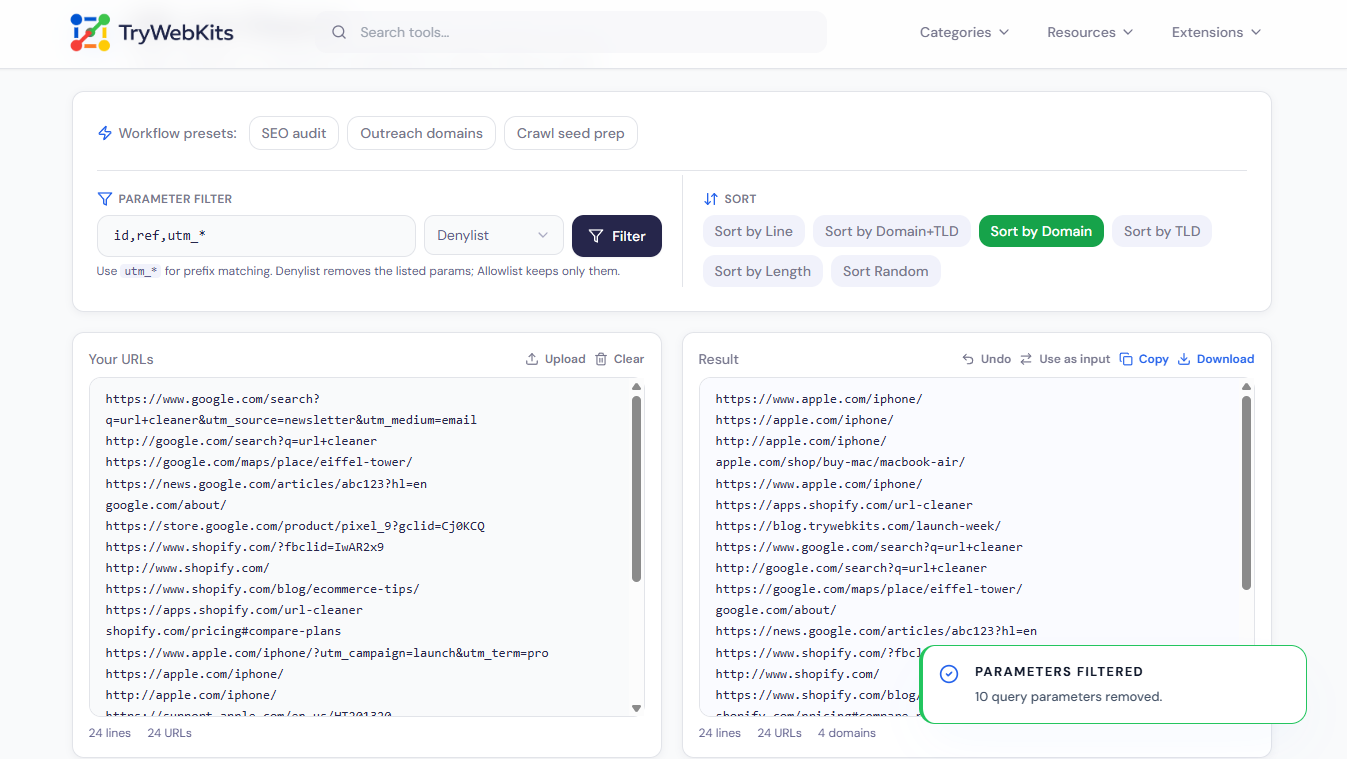
Use utm_* for prefix matching. Denylist removes the listed params; Allowlist keeps only them.
Cleanup Actions
About This Utility Tool
The URL List Cleaner is a single workspace for tidying large lists of links, the kind exported from web crawlers, analytics, sitemaps or spreadsheets. Paste the list directly or upload a .txt or .csv file holding up to 200,000 lines. From there, more than twenty actions are grouped into four simple sets: format, reduce, remove and sort. The list cleaner copes with messy input too, including mixed text, bare domains with no scheme, http and https versions of the same page, and multi-part endings such as .co.uk. Live counts show how many lines, URLs and unique domains the list holds at each step.
How To Use The URL List Cleaner?
Cleaning a messy link list takes three quick steps.
- 1
Add the URLs by pasting them or uploading a file.
- 2
Apply the actions needed, clean, filter, reduce or sort.
- 3
Copy the result, or save it as a file.
Core Capabilities Of Our URL List Cleaner
Simplify URL management with tools built for cleaning, sorting, and organizing links.
Deduplicate
Drop identical URLs, repeated domains, or duplicate http and https versions in one pass.
Reduce to Domain
Cut full links down to a root domain, main domain or chosen subfolder.
Clean Parameters
Strip query strings, fragments and tracking tags, or filter parameters by name with wildcards.
Sort Options
Order the list by line, domain, TLD or length, or shuffle it randomly.
Workflow Presets
Chain common steps for SEO audits, outreach lists or crawl prep in one tap.
Undo and Reuse
Reverse any step, or send the result back as input to keep editing.
Cleaning URL Lists In Notepad, Excel And Google Sheets
These everyday apps can handle small clean-ups, which is useful to know before reaching for a dedicated list cleaner like ours.
Notepad and Notepad++
Plain Notepad only offers Find & Replace (Ctrl+H) for simple text swaps. Notepad++ adds Edit > Line Operations > Remove Duplicate Lines and Sort Lines, plus regex search.
Microsoft Excel
Paste links into a column, then use Data > Remove Duplicates, sort A→Z, and TRIM() to clear stray spaces. SUBSTITUTE() can cut a known string from every cell.
Google Sheets
=UNIQUE() removes repeated rows, =SORT() orders them, and TRIM() tidies spacing. REGEXREPLACE() rewrites parts of each link using a pattern.
These cover basic dedupe and sorting. Anything past that, working at the domain level, handling query parameters, or trimming links, still means writing formulas by hand, which is where a purpose-built list cleaner like ours saves time.
Recommended Order For Cleaning A List
A sensible sequence keeps the result predictable, since each action runs on the one before it.
- Extract or normalize first, so every link is in a consistent shape.
- Remove tracking tags, query strings and fragments to cut the noise.
- Reduce to the domain level only when full paths are not needed.
- Deduplicate once the links are uniform, then sort last.
Basic Questions
Lists import from .txt or .csv files, and the finished result downloads as a plain text file.
An exact repeated line is a duplicate. Domain dedupe instead keeps a single URL for each registrable domain and drops the rest.
Yes. The Extract action scans each line and lifts out anything shaped like a URL, leaving the surrounding text behind.
Subdomains collapse to the registrable domain, so news.example.com becomes example.com; multi-part endings are recognised too.
You May Also Like

Lorem Ipsum Generator
Generate placeholder text for websites, apps, and documents.

Text Case Converter
Convert text between uppercase, lowercase, title case, and more

Text Compare Online
Compare texts or files with our side-by-side diff checker.

URL Unshortener
Instantly expand the shortened links before clicking them to protect yourself from malware and phishing.